⏺
Live grab
Record laps straight from the game. Save them by hand or let every session be saved automatically.
EvoTelemetry reads the telemetry of Assetto Corsa EVO while you drive, saves your laps and puts
them next to a reference lap: same point of the track, every channel, and the time difference along the whole lap.
No setup, no installer: one .exe.
Version 1.0 · Windows 10/11 64-bit · single .exe, nothing to install
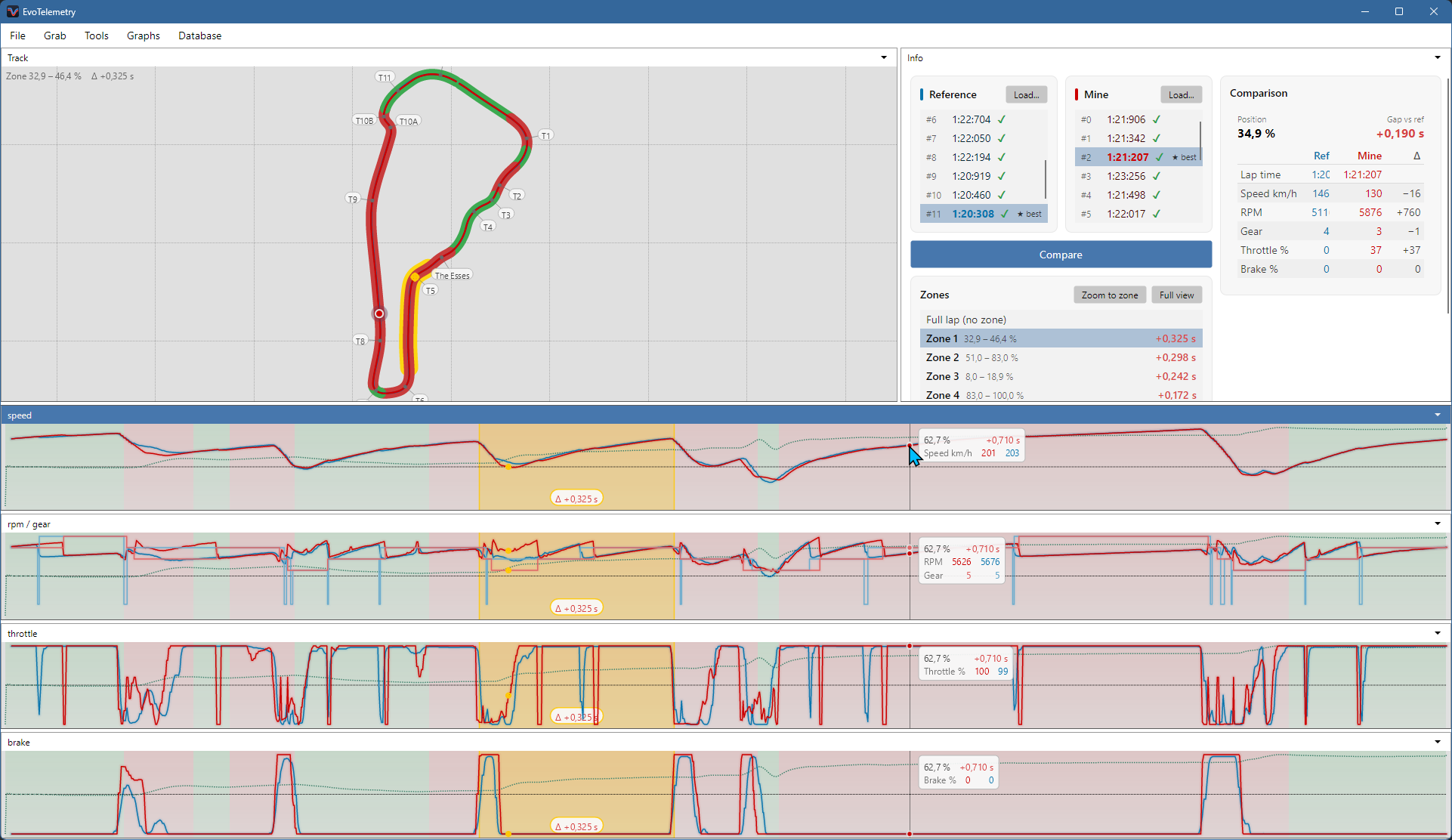
Record laps straight from the game. Save them by hand or let every session be saved automatically.
Two laps aligned by track position: speed, throttle, brake, gear, steering, side by side.
The corners where you lose or gain the most time, found for you and sorted by impact.
Dock map, info and graphs where you want. Every graph is configurable and the layout is remembered.
A clean light theme for the desk, a dark one for the night stint.
Track outlines, turn labels and, where available, satellite imagery aligned with the game.
Open the Grab window and do some laps in Assetto Corsa EVO.
Load your session and a reference: the best laps are marked for you.
Press Compare, pick a zone, zoom in and see where the time goes.
Download EvoTelemetry.exe, put it in a folder of its own and run it. Settings are saved next to it.
Documentation · Report a problem
EvoTelemetry is free. If it helps you find time on track, you can support its development:
